Tuesday, March 17, 2020

Oracle APEX Global Notification

In the APEX application properties there is a property called Global Notification where you can enter some text that will be displayed on every page - the help text says:
You can use a global notification to communicate system status. If your page template contains a #GLOBAL_NOTIFICATION# substitution string then the text entered here displays on each page. For example, suppose you entered the message "Team picnic this Friday" in this attribute. Assuming your page templates support the global notification substitution string then this message would display on each page.
To create a global notification:
1. Include the #GLOBAL_NOTIFICATION# substitution string in your page template.
2. Navigate to the Edit Application page and enter a message in the Global Notifications attribute.
3. Click Apply Changes.
So let's see what we get if we put our message here:
It works, but it isn't exactly eye-catching is it? I was hoping the page template might have some mark-up around this to liven it up, but it doesn't. I could change the page template, but I'd rather not do that as I'd prefer to use standard Universal Theme page templates that can be refreshed after upgrades. Or I could use HTML in the global notification text:
<div class="u-info padding-md">
  <span class="fa fa-info-circle"></span>
  The system will be down for essential maintenance over the weekend.
</div>
That looks like this:
That is a lot better, I think. And obviously I can vary the colour and icon according to the type of message. But it still has some drawbacks for me:
  • I need to remember that HTML mark-up each time I want to set up a global notification, or remove one.
  • I need to amend the application to do it, rather than change some data outside the application.
So I quickly devised an alternative global notification system using a table and a report region with a bespoke report template. Here is the table:
The ID is just a surrogate key. TEXT contains the plain text of the message, e.g. "The system will be down for essential maintenance over the weekend." FROM_DATETIME and TO_DATETIME allow set-up of a message that will show for a defined period only (these are optional in case I want one shown indefinitely.) Finally, STATE is a string such as 'danger', 'info', 'success', 'warning' to determine the appropriate styling and icon to use. Here is the report SQL:

select id, text
, case state
       when 'info' then 'fa-info-circle'
       when 'danger' then 'fa-hand-stop-o'
       when 'warning' then 'fa-warning'
       when 'success' then 'fa-check-circle'
       end as iconclass
, 'u-' || state as divclass       
from notices
where sysdate between nvl(from_datetime,sysdate) and nvl(to_datetime,sysdate)
and id not in (select column_value from apex_string.split(:APP_NOTICES_CLOSED))
order by case state when 'danger' then 1 when 'warning' then 2 end, state

The report SQL derives the icon type and the class to style the message based on the state. An enhancement would be to put these in a table of notification state attributes and look them up. The report region is defined on page 0 so that notifications appear on all pages, in the Before Content Body position. The region template is Blank with Attributes. I have created a bespoke report (row) template - I could have used the Universal Theme's "Alert" report template, but it isn't quite what I want. The template HTML is:

<div class="#DIVCLASS# padding-md">
  <span class="fa #ICONCLASS#"></span>
  #TEXT#
  <a href="#" id="closeNotice-#ID#" class="closeNotice" title="Hide this notice">
    <span class="fa fa-times-circle-o u-pullRight #DIVCLASS#"></span>
  </a>
</div>

OK, let's set up a few notices and see what we get...
Nice(ish). But the users might get fed up with all those messages clogging up every page. What they need is a way to dismiss them. We've already done some of the work - note the X icon at the right-hand end of each message, and this line in the report SQL:
and id not in (select column_value from apex_string.split(:APP_NOTICES_CLOSED))
We need to create an application item called APP_NOTICES_CLOSED. This will be a list of the notice IDs that the user has dismissed. Then we need the logic to maintain this item - a dynamic action defined on page 0 as follows:
  • Event: Click on Javascript Selector ".closeNotice"
  • Action: Execute Javascript code:
  • $s ('P0_CLOSE_NOTICE_ID', 
        $(this.triggeringElement).attr('id').substr(12));
    (So we also need a hidden page 0 item called P0_CLOSE_NOTICE_ID)
  • Action: Execute PL/SQL code:
  • declare
       l_count integer;
       l_tab apex_t_varchar2;
    begin   
       select count(*)
       into l_count
       from apex_string.split(:APP_NOTICES_CLOSED)
       where column_value = :P0_CLOSE_NOTICE_ID;
       
       if l_count = 0 then
          l_tab := apex_string.split(:APP_NOTICES_CLOSED);
          l_tab.extend;
          l_tab(l_tab.count) := :P0_CLOSE_NOTICE_ID;
          :APP_NOTICES_CLOSED := apex_string.join(l_tab);
       end if;   
    end;   
  • Action: Hide - Javascript expression:
    $(this.triggeringElement).closest('div');
Now, when the user clicks on the X on a notification message, we hide it and add its ID to a list of notifications that we will no longer show in this session. Next time the user logs on, all current messages will be displayed again. An obvious enhancement would be a way to dismiss messages forever once acknowledged.

So there it is - a fairly quick and dirty global notification mechanism with scope for various enhancements.

Friday, August 18, 2017

APEX Interactive Grids - what I've learned so far

My latest project has been building new pages on APEX 5.1, and quite a few of them have involved the new Interactive Grids (IGs).  I've learned I few things about them in the process, which I thought I'd record here both for my own benefit and in case it helps others.

They are addictive

I've seen a video of a David Peake presentation about IGs where he warns that developers will be tempted to overuse them.  It's true: once you've built a couple of IGs you are inclined to want to use them on every page instead of showing a report with an edit link.  They are very slick and modern in appearance.  But it's important to consider the users and whether the IG is the best interface for what they need to do.

They are very new

Like anything very new, they having teething troubles.  I've raised a number of issues on the Oracle APEX forum where things don't seem to work quite as they I would expect, or found issues that others have already raised.  These include:

A common thread here is that these questions often don't get answered.  I think this is because there is only one person who might know the answer, and he is no doubt a very busy man!

Being new they are also somewhat scant on documentation.

They are complex to configure

Out of the box you can configure a few properties of an IG via the APEX Builder such as:
  • Grid is editable or not
  • Insert/Update/Delete operations allowed or not
  • Toolbar is shown or not
  • Save and Reset buttons are shown or not
  • ... and several other things
However, they are nowhere near as declaratively configurable as Interactive Reports, which allows you to switch off individual features of the Toolbar its Actions list via property settings.  If you want to remove unwanted actions from an IG's toolbar (other than Save and Reset)  then you have to write some moderately complex Javascript that requires a knowledge of the IG's underlying architecture.  This is currently undocumented, but luckily John Snyders (who built them) has written a great series of blog posts about how to hack IGs that is indispensable if you need to make such changes.  I also found this blog post by SLino invaluable when wanting to drastically simplify an IGs config, and Explorer's review of IGs is a great way to get an overview of what is involved in developing with them.

I think that this complexity of configuration rather goes against the APEX principle of "low code", and very much hope that a lot more declarative control will be added in future versions of APEX.  But I appreciate that's a pretty tall order and Rome wasn't built in a day!

They can be slow to load

It seems that a lot of work goes on in Javascript when you load a page that has one or more IGs. On a modern browser like Chrome this isn't very noticeable and the page will be ready to use within a second or so even with a few IGs.  But IE11 (which is still the official browser for my users :-( ) takes about 5 seconds per IG, so a page with master-detail-detail IGs might take 15 seconds to initialise after page load.  I have heard that there will be some performance improvements in APEX 5.1.3, so look forward to seeing that.

Conclusions (TL;DR)

Interactive Grids are a great and powerful addition to the APEX toolkit, a vast improvement over the old tabular forms.  They should be used where they really add value, and not overused.  Being very new, they have a few issues, are not well-documented (compared to the rest of APEX), and require some quite advanced coding (and a lot of Googling) to configure if the default behaviour is not what you need.  I'm sure that by the time APEX 6.0 comes out they will be even better, and much easier to configure!

Thursday, June 29, 2017

APEX applications that run without Javascript just got harder


Long ago in 2009 I wrote a blog post called Accessible APEX and in it there is a link to an application on apex.oracle.com that would work even when Javascript was disabled in the browser.  However, since APEX 5.1 changes the way page items are mapped, that old application no longer works when Javascript is disabled.

Oh dear , never mind, who cares?  Why would anyone in 2017 want to disabled Javascript in their browser?  Why should we care if they do?  And the APEX 4.2 Installation Guide states that: 
To run or develop Oracle Application Express applications, Web browsers must have JavaScript enabled.
(I can't find the equivalent statement for APEX 5.1 but it clearly still stands.)

Well, we have to build our applications for our customers, and believe it or not some customers even in 2017 insist that the application must work when Javascript is disabled.  For example, the UK's Government Digital Services (GDS), which controls any work built for UK government public-facing websites:
Make any new web page or feature usable from the start with only HTML - no images, CSS or JavaScript, just HTML.
...
Of course, some users turn off features in their browsers deliberately - you should respect their decision and make sure they can still use your service.
(In fact, GDS's rules preclude building in APEX for other reasons, such as it not being Open Source, but there is currently one GDS service running on APEX 4.2.5 and it works when Javascript is disabled!)

Prior to APEX 5.1 this wasn't too difficult to achieve: mainly it was a case of using a basic HTML submit button on forms rather than the default APEX buttons that use Javascript.  There was more to it than that to achieve a useful application, but that was the main difference.  When the page was submitted all the page items would still be passed to wwv_flow.accept via the p_vnn parameters.  But in APEX 5.1 these parameters are gone and all the page items and values are passed as a single JSON string - which is put together by APEX using Javascript.  If you disable Javascript, the JSON string is not generated and the page item values do not get updated in session state.

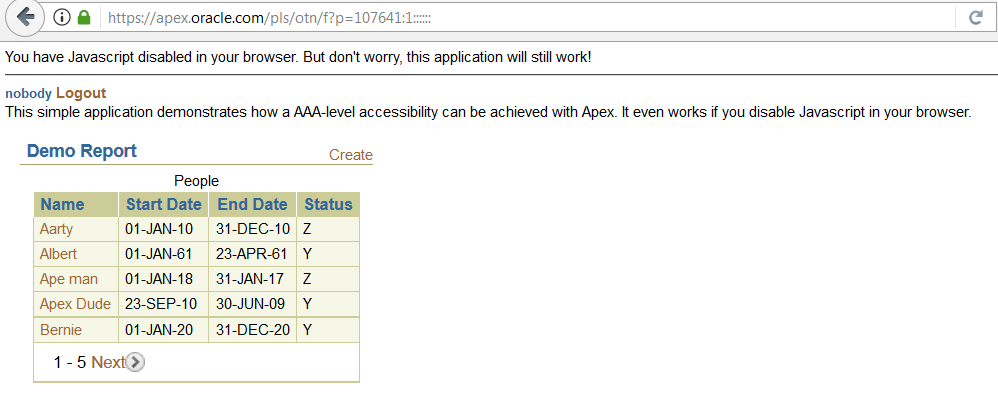
This is almost the final nail in the coffin of Javascript-disabled APEX applications - but not quite: you can still have Javascript-disabled APEX applications as long as you don't use page items!  The g_f01-g_f50 arrays used by legacy tabular forms (for example) still work, so you can use the apex_item package or your own equivalent to render HTML controls named "f01"-"f50" that get submitted via wwv_flow.accept whether Javascript is enabled or disabled.  To prove it I have created a new APEX 5.1 version of my 2009 application that works when Javascript is disabled.

It's not pretty, but it works...


If building a brand new application that had to run with Javascript disabled, APEX is probably not the ideal choice.  But at least it can be done if you really have to, and there is some kind of (difficult) upgrade path for pre-APEX 5.1 applications that are required to run with Javascript disabled.


Friday, July 22, 2016

APEX IDE for Shakespeare Programming Language (SPL)

Recently I came across an esoteric programming language called The Shakespeare Programming Language (SPL) and become rather fascinated by it.  It's big, and it's clever, but it's not terribly useful or practical.  But this year is the 400th anniversary of Shakespeare's death, which adds some relevance I suppose.

Here is an example of an SPL program taken from the SPL docs.  All it does is receive a string as input and output the same string reversed.


Outputting Input Reversedly.

Othello, a stacky man.
Lady Macbeth, who pushes him around till he pops.


                    Act I: The one and only.

                    Scene I: In the beginning, there was nothing.

[Enter Othello and Lady Macbeth]

Othello:
 You are nothing!

                    Scene II: Pushing to the very end.

Lady Macbeth:
 Open your mind! Remember yourself.

Othello:
 You are as hard as the sum of yourself and a stone wall. Am I as horrid as a flirt-gill?

Lady Macbeth:
 If not, let us return to scene II. Recall your imminent death!

Othello:
 You are as small as the difference between yourself and a hair!

                    Scene III: Once you pop, you can't stop!

Lady Macbeth:
 Recall your unhappy childhood. Speak your mind!

Othello:
 You are as vile as the sum of yourself and a toad! Are you better than nothing?

Lady Macbeth:
 If so, let us return to scene III.

                    Scene IV: The end.

[Exeunt]

I picked this one to show here because it is much shorter than the Hello World example!

I'm sure you'll agree with me that this is a language worth learning.  I decided to try it out.  There is a compiler from SPL to C available on Github, but that didn't sound much fun to me as I'm not a C programmer these days and have no particular wish to revisit it.  So I thought, why not write my own SPL to PL/SQL "compiler"?  And having done that it seemed a logically step further to build a sort of IDE for building and running SPL programs - using Oracle APEX of course, because APEX is the hammer for every nail in my life,

I am therefore proud to present my Shakespeare Programming Language IDE (I'm toying with the name "SPL Developer"):

Using this I can enter the SPL code above, click compile, and get the following generated PL/SQL code:


-- Outputting Input Reversedly.
declare
-- Othello, a stacky man.
othello t_character := t_character();
-- Lady Macbeth, who pushes him around till he pops.
lady_macbeth t_character := t_character();
-- Act I: The one and only.
begin
spl.initialise(v('P4_INPUT'));
<<acti>> null;
-- Scene I: In the beginning, there was nothing.
<<acti_scenei>> null;
-- [Enter Othello and Lady Macbeth].
-- Othello: You are nothing.
lady_macbeth.becomes( (0 ));
-- Scene II: Pushing to the very end.
<<acti_sceneii>> null;
-- Lady Macbeth: Open your mind.
othello.open_mind();
-- Remember yourself.
othello.remember();
-- Othello: You are as hard as the sum of yourself and a stone wall.
lady_macbeth.becomes( (spl.sum (lady_macbeth.val , 2 ) ));
-- Am I as horrid as a flirt-gill.
if (othello.val )= (-1 ) then
-- Lady Macbeth: If not, let us return to scene II.
null;
else
spl.log_op;
goto acti_sceneii;
end if;
-- Recall your imminent death.
othello.recall();
-- Othello: You are as small as the difference between yourself and a hair.
lady_macbeth.becomes( (spl.difference (lady_macbeth.val , 1 ) ));
-- Scene III: Once you pop, you can't stop.
<<acti_sceneiii>> null;
-- Lady Macbeth: Recall your unhappy childhood.
othello.recall();
-- Speak your mind.
othello.speak_mind();
-- Othello: You are as vile as the sum of yourself and a toad.
lady_macbeth.becomes( (spl.sum (lady_macbeth.val , -1 ) ));
-- Are you better than nothing.
if (lady_macbeth.val )> (0 ) then
-- Lady Macbeth: If so, let us return to scene III.
spl.log_op;
goto acti_sceneiii;
end if;
-- Scene IV: The end.
<<acti_sceneiv>> null;
-- [Exeunt].
end;


I've retained the original SPL as comments, followed by the PL/SQL that implements it.

I can now run it:
As you can see, I ran it with "Blog post" as input, and it returned the output "tsop golB", as expected.

I know what you're thinking: "can I have a go?"  And the answer is yes, you can! You can view and run any of the programs there, and can even add and compile one of your own if you "register" (set up a username and password).  Here it is.

I just hope Oracle can handle the traffic...

[Exeunt]

Wednesday, July 20, 2016

Conditional column linking in APEX

Sometimes there is a requirement to have a column in an APEX report that acts as a link to another page for some rows but not for others like this:
Here, only when a program's status is 'VALID' can we link to another page by clicking on the program name.

Until now I only knew a rather bad way of doing this, which would be to write code in the report query like:

select case when program_status='VALID'
       then '<a href="f?p=MYAPP:123:&SESSION.::&DEBUG.:123:P123_PROGRAM_NAME:' 
            || program_name || '">' || program_name || '</a>'
          else program_name
          end as program_name,

Not only is it ugly and hard to write, it has some other issues too:

  1. I need to change the column's "Display As" from the default to "Standard Report Column" to prevent the link HTML being escaped and displayed literally.  And this may be frowned upon as a potential security risk.
  2. If using session state protection (SSP) then I need to add a checksum to the URL by calling apex_utils.prepare_url.  Now I have a function call in the SELECT clause, which may cause performance issues.
I now have a different solution, based partly on Tyler Muth's Conditional Column Formatting post.

Here is the query for my report above:


select program_name
     , program_status
     , case when program_status != 'VALID' then 'nolink' end as class_name
  from spl_programs

The third column CLASS_NAME will be set to 'nolink' on all rows that do not have the 'VALID' status.  This column is then set to not show in the report.

In the column attributes for the PROGRAM_NAME column, I define the column link in the usual manner, except that I add class="#CLASS_NAME#" in the Link Attributes:


I can add some CSS to make "nolink" links look like plain text, and also not have the cursor change when hovering over the link:

a.nolink {
    color: #000;
    cursor: default;
}

But the user could still click on the link.  To prevent it redirecting to the other page I can change the onclick event for all "nolink" links with some "Execute when page loads" Javascript:

$('a.nolink').attr("onclick","return false;");

Now if the user clicks on the link, nothing happens.  But in theory they could disable Javascript and reinstate the default link action. Or they could view the page source or use Inspect Element to see the link's URL, and copy/paste it into the browser.  In some cases that may not matter, but if it does matter then it should be prevented, for example by adding an appropriate Authorization Scheme to the target page.

One possible issue (a colleague just reminded me) is accessibility - although it no longer looks like a link, and does nothing when clicked, to a screen reader program it is still a link, and the screen reader user may be mystified as to why it doesn't work. Perhaps instead of "return false;" it should have"alert('You cannot open this program as it is invalid');".  Or there may be a better solution?

Friday, May 27, 2016

At last APEX_PAGE.GET_URL!

I have just discovered (thanks to a tweet by @jeffreykemp) that in APEX 5.0 there is now a function called APEX_PAGE.GET_URL:


About time!  I've been using this home-made version for years:


So if I want to create a URL that redirects back to the same page with a request I can just write:

    return my_apex_utils.fp (p_request=>'MYREQUEST');

One difference is that the one I use has a parameter to decide whether or not to "prepare" the URL (add the checksum etc.)  This has been needed sometimes to ensure a URL is not prepared by the function because APEX goes ahead and prepares it again resulting in an invalid URL with two checksums.  If I recall correctly this can happen when the URL is used in a branch. Perhaps this doesn't happen in APEX 5.0 though?

Monday, May 16, 2016

APEX plugin: make tabular report responsive

I often have to build APEX applications that are responsive to the size of the screen they are running on - from desktops down to mobile phones.  While this can be achieved quite easily using a modern responsive theme, reports are often a problem.  For example, this report looks fine on a desktop:


... but gets truncated on a mobile:


Here I'm using the APEX 5.0 Universal Theme, which at least adds a horizontal scrollbar to the report, but that isn't always ideal.

I came across a solution that I liked here which uses CSS alone to reformat the report vertically on small screens - like this:


Try my demo page at http://tiny.cc/apexrr (e.g. try it on your phone).

I won't go into the details of how it works as the blog post I referenced above does that already.  However, a big attraction for me was that it does not require any Javascript, because I often have to build public website applications that need to work with Javascript disabled (yes, I know!)

Having used this technique a couple of times I decided it would be worth wrapping up into a plug-in.  After some deliberation I decided to make it a dynamic action plug-in, so that it can be added to apply the styling to a specified report region without having to manually add any CSS to the page.  However, it is an unusual dynamic action because it doesn't actually do anything dynamic - the Javscript function it performs is a dummy that does nothing.  The useful work is done by CSS that the plug-in adds to the page while rendering.

There are 3 settings for this plug-in - 2 at application level and 1 at component level:

  • Application setting 1: CSS class of the report's container.  This is normally a div that surrounds the whole report, which will have its width set to 100% on small screens by the plug-in.
  • Application setting 2: CSS class of report data table.  This is the table that contains just the report data (not the pagination etc.), which will be transformed by the plug-in.
  • Component setting 1: Max screen width (px) affected   This governs when the transformation kicks in - default is 760 (pixels).
My thinking (currently) is that the classes will be the same from region to region within the same applicaiton, as they come from the report template, whereas the screen width at which the report needs to be transformed could vary from one region to another.

When installing the plug-in you need to set the 2 application settings for the CSS classes appropriately for the report templates you are using.

To use the plug-in you need to create a dynamic action for each report region to which it needs to be applied as follows:
  • Event: Page load
  • Condition: none
  • Action: this plug-in
  • Max screen width (px) affected: as you wish (or leave as default)
  • Selection type: Region
  • Region: the region to apply it to
There are some limitations and caveats to be aware of:
  1. It only works on classic reports, not interactive reports.  I'm not really sure it would make sense on IRs, and their HTML is different to that of classic reports.
  2. Column header sorting functionality is lost when the report is transformed for the small screen,
  3. The report headings must be enclosed in a element - you may need to edit your report template and add this (in the before/after column heading sections).
  4. The data table must have a class (to use in the component settings) - again, the report template can be edited if necessary.
If anyone cares to try it out and can give any feedback on how this could be improved I'd be glad to receive it - it will be available on apex-plugin.com very soon.

Friday, April 08, 2016

Trello is my new knowledge base

How often do you hit an issue in development and think "I know I've had this problem before, but what's the solution?"  Most days if you've been around a long time like me.  It could be "how do you create a transparent icon", or "what causes this Javascript error in an APEX page".  So you can spend a while Googling and sifting through potential solutions that you vaguely remember having seen before.

A few years ago I decided that whenever I solve an issue like this I should make a note somewhere of the issue and solution for future reference.  Initially I did that in an APEX application I built at my place of work - in fact I intended to share it with other developers, though no one else really bothered with it.  It was a kind of in-house developer forum with one user, me.

The downside of that was that I could only access the information from my place of work, and when I moved to another employer I had to leave it behind.  I considered moving it to APEX on the cloud somewhere, but by then I'd started using Trello for managing my workload on different projects, both work and personal.  Trello is really simple and effective: rather than describe it here I'll point to their own board basics page.  Also it's cloud-based so I can access it from anywhere.  I realised it would work rather nicely for my personal "knowledge base".  So I created a new board called "QandA". It looks like this:

The board consists of three lists:
  1. Solved
  2. Unsolved
  3. Help/About
The Solved list obviously contains issues that I have previously solved - this is the real "knowledge base".  The Unsolved list is stuff I'm currently solving or will need to solve.  The Help/About list is just some brief help in the unlikely event that I forgot how to use the board.

When I hit a new issue I add a card to the Unsolved list, with a title describing the problem e..g. "How to #toggle an #img #icon using just #css".  I've been using hashtags like that to aid future searching a bit (and anyway you have to have hashtags everywhere these days anyway don't you?) 

When I find out something about the solution to the problem I update the card and add the new information.  This can be a comment, a link to a web site, a picture, a Word document attachment or whatever.  Some things I add may be potential solutions that I haven't got time to check out right now.

Eventually, the problem is solved (hopefully) and then I drag and drop the card to the Solved list, and perhaps edit it to remove potential solutions I had noted but didn't work.  My knowledge repository has grown bigger.

OK now some months later I hit an issue with jQuery in Internet Explorer (of course) and I think I've solved it before.  So I open up my Trello board and filter using the relevant keywords:

In the solved list I can now see just the 4 cards that have both #ie and #jquery in them somewhere.  I see the card I'm interested in, open it up and I have the solution.  Lots of time saved!

TL;DR: use Trello, it's great!


Friday, March 04, 2016

Can't make my mind up about "Feuerstein refactoring"

When writing large PL/SQL processes I do like to try to make the code as readable as possible.  One way is to follow Steven Feuerstein's advice as exemplified here in a blog post and here in a Youtube video  to refactor the code into small chunks. I have done that, but then find I have my doubts about it.  My problem with it is that it breaks the code into small local procedures and functions which then access variables declared at a higher scope.  That seems to break a commandment of structured programming and reminds me of my early FORTRAN days and the "common block".

An example from the blog post above is varable l_required_info: this is declared in the main function can_show_information and then used within subprograms like player_can:

      FUNCTION player_can (moment_in IN VARCHAR2)
         RETURN BOOLEAN
      IS
         l_return   BOOLEAN;
      BEGIN
         l_return :=
            CASE moment_in
               ...
               WHEN qdb_competition_mgr.c_resavail_closed
               THEN
                     c_closed_or_ranked
                  OR (    info_type_in = c_see_correctness
                      AND l_required_info.players_accept_quizzes =
                             qdb_config.c_yes)
      ...
            END;

         RETURN l_return;
      END;

(I removed some of the code to focus on the bit I'm interested in).

So this function player_can takes in one parameter moment_in and returns a value, but within it accesses variables from "outside" itself, e.g. l_required_info.  I don't mind the constants like c_see_correctness, because constants are, well, constants.  But the variables disturb me. Another procedure get_required_info changes the value of this variable, also without it being passed in as a parameter:

      PROCEDURE get_required_info
      IS
      BEGIN
         OPEN required_info_cur;

         FETCH required_info_cur INTO l_required_info;

         CLOSE required_info_cur;

My structured programming head makes me want to avoid this by passing all the values that each subroutine uses explicitly as parameters.  But then it all becomes a lot more verbose of course.  I have found myself writing code in the Feuerstein style, but then feeling edgy about having to defend it when others have to maintain it! (Most people are quite happy to write a single procedure hundreds or thousands of lines long of course!)

What do you think?  Are my concerns legitimate or am I just behind the times with my "structured programming" tendency?

Wednesday, July 15, 2015

Another new APEX-based public website goes live

Another APEX public website I worked on with Northgate Public Services has just gone live:

https://londontribunals.org.uk/

This is a website to handle appeals against parking fines and other traffic/environmental fines issues by London local authorities.

It is built on APEX 4.2 using a bespoke theme that uses the Bootstrap framework.  A responsive design has been used so that the site works as well on a mobile phone as on a desktop.

Rumours that appeals against any parking tickets with my car's registration number on them are automatically approved by the system are completely unfounded.

Monday, February 02, 2015

Why won't my APEX submit buttons submit?

I hit a weird jQuery issue today that took a ridiculous amount of time to solve.  It is easy to demonstrate:

  1. Create a simple APEX page with an HTML region
  2. Create 2 buttons that submit the page with a request e.g. SUBMIT and CANCEL
  3. Run the page
So far, it works - if you press either button you can see that the page is being submitted.  

Now edit the buttons and assign them static IDs of "submit" and "cancel" respectively.  Run the page again - the buttons no longer work!  If you check for Javascript errors you will see that you are getting "Uncaught TypeError: object is not a function" (in Chrome) or similar.

Apparently this is a known issue with jQuery (see http://bugs.jquery.com/ticket/1414): 
Forms and their child elements should not use input names or ids that conflict with properties of a form, such as submit, length, or method. Name conflicts can cause confusing failures. For a complete list of rules and to check your markup for these problems, see DOMLint.

Wednesday, September 17, 2014

Ignoring outliers in aggregate function

This is another aide-memoire for myself really.  I want to calculate the average load times per page for an application from timings stored in the database, and see which pages need attention. However, the stats can be skewed by the odd exceptional load that takes much longer than a typical load for reasons that are probably irrelevant to me.

Here is a fictitious example:

create table timings (id int, timing number);

insert into timings
select rownum, case when rownum=50 then 1000 else 1 end
from dual
connect by rownum <= 100;

This example has 99 timings of 1 second plus an oddity of 1000 seconds.

A simple average gives a skewed picture:

SQL> select avg(timing) from timings;

AVG(TIMING)
-----------
      10.99

It suggests that users are waiting 11 seconds on average for a page to load, when in fact it is usually 1 second.

The analytic function NTILE(n) can solve this.  This divides the set of results into n "buckets" and then tells us which bucket a particular value falls into.  If we do that with a suitable number of buckets, say 10, we will be able to exlude the highest 10% and lowest 10% of the values:

SQL> select avg(timing) from 
  2  (select timing, ntile(10) over(order by timing) bucket
  3   from timings)
  4  where bucket between 2 and 9;

AVG(TIMING)
-----------
          1


Thursday, September 11, 2014

Why use CASE when NVL will do?

I've found that many developers are reluctant to use "new" features like CASE expressions and ANSI joins. (By new I mean: this millennium.)

But now they have started to and they get carried away.  I have seen this several times recently:

    CASE WHEN column1 IS NOT NULL THEN column1 ELSE column2 END

Before they learned to use CASE I'm sure they would have written the much simpler:

    NVL (column1, column2)

Now I now that NVL is Oracle-specific and CASE is portable, but (a) we aren't ever going to be porting our millions of lines of PL/SQL, and (b) I can guarantee they didn't do it for that reason. They have got a new hammer and now everything looks like a nail.

Saturday, August 30, 2014

Handy pre-defined Oracle collections

Note to self:

  1. SYS.DBMS_DEBUG_VC2COLL is a handy pre-defined TABLE OF VARCHAR2(1000)
  2. SYS.KU$_VCNT is TABLE OF VARCHAR2(4000)

Both are granted to public.

Thanks to Eddie Awad's blog for these.

Tuesday, June 10, 2014

Hiding APEX report pagination when trivial

The users are quite happy with pagination like this:


However, they don't like it when the report returns less than a pageful of rows and they see this:


(Fussy, I know).

This is one way to do it.  First, ensure that the pagination area itself is identifiable.  I put a div around it with a class of "pagination":

Then add some Javascript to the "Execute when page loads" attribute of the page:

$('div.pagination').each(function() {
    if ($(this).find('td.pagination a').length == 0
       && $(this).find('div.msg').length == 0
       ) {
    $(this).hide();
    }
})

It looks for pagination areas that contain no links and no “reset pagination” error message, and hides them.

The Javascript could go into the page templates to fix the issue across all pages.

Monday, May 26, 2014

APEX boilerplate translation

APEX provides a mechanism for translating applications into other languages:

Applications can be translated from a primary language into other languages. Each translation results in the creation of a new translated application. Each translation requires a mapping which identifies the target language as well as the translated application ID. Translated applications cannot be edited directly in the Application Builder.
Once the translation mappings are established the translatable text within the application is seeded into a translation repository. This repository can then be exported to an XLIFF for translation.
Once the XLIFF file is populated with the translations, one file per language, the XLIFF file is uploaded back into the translation repository. The final step is to publish each translated application from the translation repository.
A translated application will require synchronization when the primary application has been modified since the translated version was last published. Even modifications to application logic will require synchronization. To synchronize, seed and publish the translated application.
I have never used this method, but I have worked on a number of APEX applications that can be translated into other languages by other means.  Essentially this is a matter of "soft-coding" all boilerplate such as region titles and item labels - holding them as data in tables and selecting the appropriate values at run time.

For item labels there is a neat solution involving APEX shortcuts.  First we define a table to hold the item labels in all the languages we support something like this:

APP_IDITEM_NAMELANGUAGELABEL_TEXT
101P1_EMPNOENGEmployee identifier
101P1_EMPNOESIdentificación del empleado
101P1_EMPNOFRIdentifiant des employés

Now we need a function to get the label text for an item in the current language, something like:

function label_text (p_app_id number,
                     p_item_name varchar2,
                     p_language varchar2)

Then we can create an APEX label template with "Before label" HTML like this:
<label for="#CURRENT_ITEM_NAME#">"LABEL_TEXT"
"LABEL_TEXT" is a reference to an APEX shortcut which we can now define using PL/SQL function body:
return translate_pkg.label_text(:APP_ALIAS,'#CURRENT_ITEM_NAME#',:AI_LANGUAGE)
(AI_LANGUAGE is an application item defining the user's preferred language.) All we now need to do is use the new label template on all our page items and leave the item's label attribute blank.

It would be nice if we could do something similar for region titles, but unfortunately APEX shortcuts are not currently supported in region titles. Instead we have to make do with creating a hidden item e.g. P1_EMP_REGION_TITLE that we set to the desired title, and then set the region title to &P1_EMP_REGION_TITLE. That still leaves the matter of translating error messages and of course the actual data, but I won't go into that in this post.

Wednesday, April 16, 2014

HGV Levy

The UK government has introduced a new service for foreign lorry drivers to pay a levy to use UK roads here:

https://www.hgvlevy.service.gov.uk/

It was built by my current employer, Northgate Information Solutions. Guess what technology it runs on?
We had a lot of interesting challenges when building this:
  • Compliance with UK Government styling and standards
  • Responsive design to work on desktops, tablets and mobiles
  • Accessibility
  • Usable with Javascript disabled
  • Translated into 5 European languages
You can read more about this project here on the Northgate website.

Sunday, January 26, 2014

It's a drag...

It really used to be a "drag" putting together a set list for my band using my Oracle database of songs we play: the easiest way was to download all the songs to an Excel spreadsheet, manipulate them there, then re-import back into the database.  I tried various techniques within APEX but none was easier than that - until now.  I have just discovered jQuery UI's Sortable interaction, and in a couple of hour was able to build exactly what I'd always needed:
(That is is one of our recent set lists: I never claimed we were cool - we're called The Love Handles after all.)

The full list of songs (minus any already selected) appears in the first list.  Then there are 4 more lists corresponding to sets (we usually have 2 sets, with a 3rd to hold "spares" in case we under-run or get asked to play on.  Occasionally we play 3 sets.) I can now:

  • Add a song to a set by dragging it from the Songs list to the desired Set list
  • Remove a song from a set by dragging it from the Set list back to the Songs list
  • Move songs from one set to another by drag and drop
  • Move a song up and down within a set by drag and drop

It really was incredibly simple to achieve.  First I needed to include the relevant jQuery library into my page:

#IMAGE_PREFIX#libraries/jquery-ui/1.8.22/ui/minified/jquery.ui.sortable.min.js

(This is shipped with APEX but not included in applications by default.)

Then I constructed the HTML for each list as follows:

<ul class="connectedSortable">
<li class="set1"><input type="hidden" name="f01" value="123" />Land of 1000 Dances</li>
...
</ul>
<input type="hidden" name="f01" value="0" />

Explanation:

  • Each of the 5 lists has the same class "connectedSortable".  This is what allows us to drag and drop between them.
  • Each list item consists of a hidden item containing the song's ID in the database, and the song title to be displayed.  All the hidden items have name="f01" so that they will all appear in an APEX array g_f01 when the page is submitted. (The class "set1" is only there so that I can colour each list differently.)
  • After each list I put another hidden item also named "f01" with a value of 0.  This acts as a separator between the lists when processing the g_f01 array - if the value is 0 I know that I have reached the end of a list and am starting the next.
  • Originally, I built each list as a report region, with a bespoke region and report template.  But after a while I realised it was simpler to use PL/SQL regions to dynamically render the HTML.

Now for the Javascript that makes it all work:

  $(function() {
    $( ".connectedSortable" ).sortable({
      connectWith: ".connectedSortable"
    }).disableSelection();
  });

That's it - just that.

Finally I just had to write some PL/SQL to process the array when the page is submitted:

declare
   l_set_no integer := 0;
begin
   apex_collection.create_or_truncate_collection ('SETLIST_EDITOR');
   for i in 1..apex_application.g_f01.count
   loop
      if apex_application.g_f01(i) = 0 then
         -- End of set
         l_set_no := l_set_no + 1;
      else
         -- Song: add to current set
         apex_collection.add_member
            ( 'SETLIST_EDITOR'
            , l_set_no
            , apex_application.g_f01(i)
            );
      end if;
   end loop;
end;

I'm using a collection here, which I populated on initial page load from the database. I could have worked on the set list table directly, but this allows me to submit the page if needed for other reasons without saving or losing the changes.

You can see the final result on this apex.oracle.com demo.

I think jQuery is now my second-favourite developer tool (after APEX of course).


Wednesday, September 18, 2013

SQL Developer: add a "child tables" tab to table definition

I always like to extend SQL Developer's table definition by adding a tab that shows the "child tables" for each table - i.e. the tables that have a foreign key to the table in context.

I have lost count of how many times I have started work at a new environment or on a new PC and had to set this up from scratch, so thought I'd document it here for next time!

First, create a file containing the following XML:

<items>
  <item type="editor" node="TableNode"  vertical="true">
      <title><![CDATA[Child Tables]]></title>
         <query>
             <sql><![CDATA[select cons.table_name, cons.constraint_name
                      from all_constraints cons
                      where cons.constraint_type = 'R'
                      and (cons.r_constraint_name, cons.r_owner) in
                                         (select pk.constraint_name, pk.owner
                                          from   all_constraints pk
                                          where owner = :OBJECT_OWNER 
                                          and table_name = :OBJECT_NAME
                                          and constraint_type in ('P','U'))]]>
             </sql>
         </query>
   </item>
</items>

Then, in SQL Developer go to Tools->Preferences... and open the Database node and select user Defined Extensions.

Click Add Row and on the new row set Type to EDITOR and Location to point to your XML file.

That's it.  You may just need to restart SQL Developer to make it work.

I am indebted to Sue Harper's blog for the detailed instructions on adding tabs to SQL Developer.

Another tab I like to add is one to show the errors for an invalid view definition:

<items>
 <item type="editor" node="ViewNode"  vertical="true">
    <title><![CDATA[ERRORS]]></title>
      <query>
         <sql><![CDATA[SELECT
     ATTRIBUTE, LINE
     || ':'
     ||POSITION "LINE:POSITION", TEXT
FROM
     All_Errors
WHERE
     type  = 'VIEW'
 AND owner = :OBJECT_OWNER
 AND name  = :OBJECT_NAME
ORDER BY
     SEQUENCE ASC
         ]]></sql>
      </query>
 </item>
</items>

(Update 2019: SQL Developer now includes an Errors tab for views already, so this is redundant.)

Friday, June 14, 2013

APEX conditions and performance - part 2

This is a follow-up to my previous post APEX conditions and performance.

Roel Hartman has followed up my post by doing the due diligence and testing the performance of different APEX condition types.  His findings back up what I just asserted. (But I wasn't just guessing, my assertions were based on facts I learned long ago from someone in the APEX team via the Oracle APEX forum - so long ago that I cannot now find the conversation!)

As I said previously, for a more complex condition than "item=value" you will often have to use a PL/SQL expression condition, and that's fine.  However, it is not uncommon to see a page where there is a group of several items that all have the same complex condition.  For example, perhaps if some complex condition is true then we need to collect the user's bank details and contact details - maybe 12 items.  The same complex condition is applied (and has to be evaluated) for each of the 12 items.  In this sort of case it may be appropriate to add child regions to the form region, and apply the complex condition just once - to the child region that contains this group of conditional items.  A suitable region template (perhaps even "no template") can be applied to these new child regions so that the appearance of the page is not changed by adding them.

Example 1: original page

Region: My Form
- Item: Name
- Item: Date of Birth
- Item: Bank Account No (complex condition)
- Item: Bank Sort Code (complex condition)
...
- Item: Address Line 1 (complex condition)
- Item: Address Line 2 (complex condition)
...
- Item: Something else

Example 2: page using child regions

Region: My Form
- Subregion: Personal Details
-- Item: Name
-- Item: Date of Birth
- Subregion: Bank and Address details (complex condition)
-- Item: Bank Account No
-- Item: Bank Sort Code
...
-- Item: Address Line 1
-- Item: Address Line 2
...
- Subregion: More stuff
-- Item: Something else

Example 2 achieves the same result as Example 1 but only evaluates the complex condition once instead of many times.  As well as improving performance this also makes your page simpler: if the condition changes in the future you only have one instance to change.